Remix v2 Single-Fetch Architecture: Why It Beats Traditional SPAs and Next.js
An in-depth technical analysis of Remix’s single-fetch design, progressive enhancement philosophy, and nested route loader execution.

1. Introduction: The Frontend Data Fetching Evolution
React's data story has been a slow search for the right place to put a fetch.
We started with Redux thunks: global stores, action creators, and a lot of ceremony to answer "where does this data live?" Then React Query (and SWR) arrived and fixed the real problem, server state, by treating remote data as a cache with staleness rules instead of something to hand-copy into a reducer. Then Server Components moved fetching onto the server and let components await their data directly. And route-based loaders, the model Remix popularized and React Router now ships, went back to an old idea: the URL determines what data a page needs, so the router should fetch it.
Every step fixed something. But one failure mode survived nearly all of them: the network waterfall disguised as modular architecture. Components are small, each owns its data, and each fires its own request when it mounts. The code looks clean. The network trace looks like a staircase.
Route loaders attack this at the root. Because the router knows the whole route tree before rendering anything, it can start every fetch for that tree at once. Remix v2's Single Fetch takes the next step: it collapses those parallel per-loader requests into one HTTP request, serialized with a format that can carry dates, promises and errors.
The thesis of this article: for route-shaped applications, a router-level, single-request loader model eliminates client-side waterfalls by construction, not by developer discipline. It beats a traditional SPA decisively. Against Next.js's App Router the picture is more nuanced, and I'll be explicit about where each wins. Remix's design is also where React Router v7 landed, so what you learn here carries forward.
2. The Anatomy of Client-Side Waterfalls in Traditional SPAs
Here's the classic SPA load, traced step by step for /projects/42/tasks:
Time ──────────────────────────────────────────────────────────────▶

Browser   ├─ GET /projects/42/tasks ─▶ HTML shell (empty <div id="root">)
                                      │
                                      ├─ GET /assets/app.js ───────────▶ (parse + compile)
                                                                        │
                                                                        ├─ mount <ProjectLayout/>
                                                                        │     └─ useEffect → GET /api/projects/42 ──▶
                                                                        │                                            │
                                                                        │                       render children ◀───┘
                                                                        │                          └─ mount <Tasks/>
                                                                        │                              └─ useEffect → GET /api/projects/42/tasks ──▶
                                                                        │                                                                              │
                                                                                                                                          first real content ◀──┘
Four dependent stages:
- Download skeleton HTML. It contains no content, so First Contentful Paint is blank.
- Download the JS bundle. Nothing can start until it's fetched, parsed and executed.
- Mount the root/parent component, whose effect triggers the parent's fetch.
- Mount the nested child, but only after the parent's data arrives and it renders, and only then trigger the child's fetch.
Steps 3 and 4 are the killer. The child's request can't start until the parent's request finishes, even though nothing in the child's data actually depends on the parent's data. The dependency is created by the rendering structure, not by the data.
What this costs
With a 150 ms round trip (common on mobile), each stage adds at least one RTT, plus TCP/TLS setup for the first connection. Four sequential stages is 600+ ms of pure latency before any server work, bandwidth or rendering. On a 400 ms RTT connection it's over a second and a half. The waterfall scales with network latency times tree depth, which are the two things you control least.
Why useEffect fetching is an anti-pattern here
It isn't only about speed. Effect-based fetching has structural problems:
- Effects run after render and paint, so fetching begins as late as possible by design.
- Race conditions are yours to solve: without cleanup, a slow response for /projects/41 can overwrite /projects/42.
- No cancellation, deduplication or caching unless you rebuild them.
- Loading and error state multiply: every component gets its own isLoading, error and data, and the UI becomes a patchwork of spinners popping in at different times.
- Server rendering can't wait for effects, so SSR HTML ships with empty states and the client redoes the work.
3. Deep Dive: How Remix Single Fetch Actually Works
Before: one request per loader
In earlier Remix v2 behavior, navigating to /projects/42/tasks triggered a separate request per matched route loader, all in parallel:
GET /projects/42/tasks?_data=routes/projects.$id
GET /projects/42/tasks?_data=routes/projects.$id.tasks
These are parallel, not sequential, so there was no render-then-fetch waterfall. But each request carried its own HTTP overhead, its own cache and header semantics, and, on serverless or edge platforms, its own function invocation, cold start and repeated work like session lookup and auth.
After: one stream
With Single Fetch, the client makes one GET to a .data URL, and the server runs every needed loader and streams the combined result back:
GET /projects/42/tasks.dataWhen some loaders don't need to re-run (for example, the parent's params didn't change), the client narrows the request with a _routes query parameter, so only the loaders that need to run are executed. The URL shapes above are simplified, so check the docs for exact details in your version.
Multi-fetch (v1-style)                 Single Fetch
──────────────────────                 ────────────
Client ─┬─▶ GET loader A               Client ───▶ GET /path.data
        └─▶ GET loader B                            │
             (2 requests,                           ├─ run loader A ┐ in parallel
              2 invocations)                        ├─ run loader B ┘
                                                    ▼
                                          one streamed response
The serialization engine: turbo-stream
Plain JSON can't represent much of what real loaders return. JSON.stringify turns a Date into a string, drops undefined, throws on BigInt, and has no concept of a promise. Single Fetch replaces it with turbo-stream, a streaming serialization format that natively handles:
- Date, BigInt, undefined, Map, Set, URL, RegExp, Symbol
- Error objects
- Promises, which is the key feature. A promise in the result is encoded as a placeholder, and its resolved value is streamed later on the same connection.
Conceptually (simplified; the real wire format differs in details), the response looks like:
[ { route: 'routes/projects.$id.tasks', data: { tasks: ..., activity: <Promise#5> } } ]   ← flushed immediately
P5:[ ...activity feed... ]                                                                  ← streamed when it resolves
The client hydrates the first chunk right away and resolves the promise when the later chunk arrives. This replaces the old defer() API. You just return promises, and they can be nested anywhere in the returned object, not only at the top level.
Nested loaders with deferred streaming
// app/routes/projects.$id.tsx  (parent layout route)
import type { LoaderFunctionArgs } from "@remix-run/node";
import { Outlet, useLoaderData } from "@remix-run/react";

export async function loader({ params }: LoaderFunctionArgs) {
  const project = await db.project.findUniqueOrThrow({
    where: { id: params.id },
  });
  // Date survives serialization as a real Date
  return { project, createdAt: project.createdAt };
}

export default function ProjectLayout() {
  const { project, createdAt } = useLoaderData<typeof loader>();
  return (
    <section>
      <h1>{project.name}</h1>
      <p>Created {createdAt.toLocaleDateString()}</p>
      <Outlet />
    </section>
  );
}// app/routes/projects.$id.tasks.tsx (child route)
import type { LoaderFunctionArgs } from "@remix-run/node";
import { Await, useLoaderData } from "@remix-run/react";
import { Suspense } from "react";
export async function loader({ params }: LoaderFunctionArgs) {
// Critical data: awaited, included in the first chunk
const tasks = await db.task.findMany({ where: { projectId: params.id } });
// Non-critical data: NOT awaited, streamed later on the same connection
const activity = db.activity.recent(params.id!);
return { tasks, activity };
}
export default function Tasks() {
const { tasks, activity } = useLoaderData<typeof loader>();
return (
<>
<ul>{tasks.map((t) => <li key={t.id}>{t.title}</li>)}</ul>
<Suspense fallback={<p>Loading activity…</p>}>
<Await resolve={activity} errorElement={<p>Activity unavailable.</p>}>
{(items) => (
<ul>{items.map((a) => <li key={a.id}>{a.summary}</li>)}</ul>
)}
</Await>
</Suspense>
</>
);
}Both loaders run in parallel inside one request. The page becomes interactive with the critical data immediately, and the activity feed fills in when it's ready.
4. Architectural Face-Off: Remix Single Fetch vs. Next.js App Router (RSC)
Both frameworks avoid client-side waterfalls. They get there with different mental models, and it's a design comparison, not a winner-take-all one.
Mental models
Next.js App Router organizes the app as a tree of Server Components. Components await their own data, the server renders the tree into the RSC (Flight) payload, and you draw explicit "use client" boundaries where interactivity begins. Navigations fetch the RSC payload for the changed segments, also streamed, also one request.
Remix Single Fetch is route-centric. Data requirements live in loader and action functions attached to URL segments, built on standard Request/Response, FormData and Headers. Components are ordinary client-hydrated React components that receive already-resolved data.
Comparison
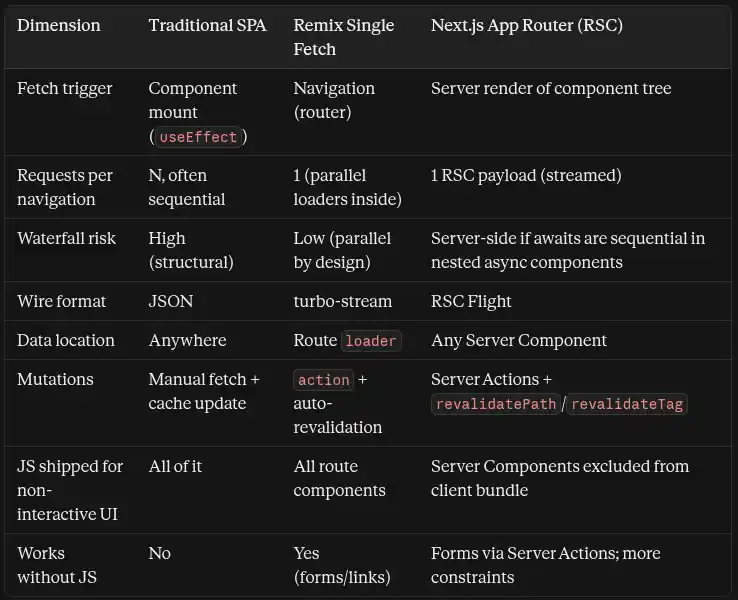
Where the mental overhead differs
Caching. Remix has no framework-level data cache. You use HTTP semantics (Cache-Control via the route headers export, CDN rules) and your own data layer. Next.js has invested in framework-level caching, and its model has changed significantly across recent versions, from implicit caching by default to more explicit opt-in caching. Powerful, but it's a larger surface to learn and to keep up with.
Revalidation. In Remix, after any action completes, active loaders revalidate automatically, so the UI can't drift from server state unless you opt out with shouldRevalidate. In Next.js you call revalidatePath or revalidateTag yourself and must decide what is stale.
Bundle and hydration. This is where I'll concede ground. RSC keeps server-only component code out of the client bundle and hydrates only client components, which is a real win for content-heavy pages. Remix ships and hydrates each route's component tree, mitigated by route-level code splitting and Suspense boundaries but not eliminated.
Server-side waterfalls. RSC doesn't magically avoid waterfalls. Nested async components that each await in sequence create them, just on the server where latency to the database is small. Mitigations exist (Promise.all, preloading, Suspense), but they require discipline. In Remix, loader parallelism is guaranteed by the router.
5. Data Mutations and Ending useState Fatigue
Progressive enhancement by default
A Remix <Form> renders a real <form method="post">. Without JavaScript, the browser submits it natively, the server runs the action, and the response is a full page. With JavaScript, Remix intercepts the submit, calls the action over fetch, and updates the page without a reload. It's the same code path, and the app works before hydration finishes, on flaky networks, and for the small share of users where scripts fail.
Automatic revalidation
After an action, Remix re-runs the loaders for the active routes. You never write "after creating a task, invalidate the tasks query." The mutation is followed by fresh data as a matter of architecture, and with Single Fetch that revalidation is consolidated into single-fetch requests instead of one per loader. To opt a route out, export shouldRevalidate.
Optimistic UI without the boilerplate
The router exposes in-flight submission state (useNavigation for page-level navigations, useFetcher for inline interactions), including the submitted formData. The optimistic value is derived from that, so there's no manual state to keep in sync or roll back:
// app/routes/projects.$id.tasks.tsx (mutation half)
import { data } from "@remix-run/node";
import type { ActionFunctionArgs } from "@remix-run/node";
import { useFetcher } from "@remix-run/react";
import { z } from "zod";

const CreateTask = z.object({
  title: z.string().trim().min(1, "Title is required").max(120),
});

export async function action({ request, params }: ActionFunctionArgs) {
  const form = await request.formData();
  const parsed = CreateTask.safeParse(Object.fromEntries(form));

  if (!parsed.success) {
    return data(
      { ok: false as const, errors: parsed.error.flatten().fieldErrors },
      { status: 400 }
    );
  }

  await db.task.create({
    data: { title: parsed.data.title, projectId: params.id! },
  });
  return { ok: true as const };
}

export function NewTaskForm() {
  const fetcher = useFetcher<typeof action>();
  const pendingTitle = fetcher.formData?.get("title");
  const errors = fetcher.data && !fetcher.data.ok ? fetcher.data.errors : null;

  return (
    <fetcher.Form method="post">
      <input name="title" aria-invalid={!!errors?.title} />
      {errors?.title && <p role="alert">{errors.title[0]}</p>}
      <button disabled={fetcher.state !== "idle"}>Add task</button>

      {pendingTitle && (
        <p className="opacity-60">Adding “{String(pendingTitle)}”…</p>
      )}
    </fetcher.Form>
  );
}
There's no useState for the field, none for loading, none for errors, and no cache update. Validation errors come back as data from the server, and if JavaScript is unavailable the form still posts and works.
6. Edge Deployment, Streaming, and Error Boundaries
Streaming over one connection
Everything streams over the same HTTP connection: the HTML document streams via React's Suspense, and on client navigations the .data response streams deferred promises. Slow data no longer holds the page hostage, because the shell and critical content go out first and the rest follows out of order as each boundary resolves.
Single Fetch introduced a server-side timeout for those streams, set in entry.server.tsx:
// app/entry.server.tsx (Web Streams runtime, e.g. Cloudflare Workers)
import type { AppLoadContext, EntryContext } from "@remix-run/cloudflare";
import { RemixServer } from "@remix-run/react";
import { isbot } from "isbot";
import { renderToReadableStream } from "react-dom/server";

// Deferred promises still pending after this are rejected
export const streamTimeout = 5_000;

export default async function handleRequest(
  request: Request,
  responseStatusCode: number,
  responseHeaders: Headers,
  remixContext: EntryContext,
  _loadContext: AppLoadContext
) {
  const controller = new AbortController();
  const timeoutId = setTimeout(() => controller.abort(), streamTimeout + 1000);

  const body = await renderToReadableStream(
    <RemixServer context={remixContext} url={request.url} />,
    {
      signal: controller.signal,
      onError(error: unknown) {
        console.error(error);
        responseStatusCode = 500;
      },
    }
  );

  body.allReady.then(() => clearTimeout(timeoutId));

  // Crawlers get the fully rendered document
  if (isbot(request.headers.get("user-agent") || "")) {
    await body.allReady;
  }

  responseHeaders.set("Content-Type", "text/html");
  return new Response(body, { headers: responseHeaders, status: responseStatusCode });
}
Isolated error boundaries
Every route can export its own ErrorBoundary. When a child loader throws, the child's boundary renders while the parent layout and sibling routes stay intact. This works because the single response is structured per route: the parent's data and the child's error travel together in the same payload, so one failed widget produces a partial page, not a failed response.
import { isRouteErrorResponse, useRouteError } from "@remix-run/react";

export function ErrorBoundary() {
  const error = useRouteError();

  if (isRouteErrorResponse(error)) {
    return <p>{error.status}: {error.statusText}</p>;
  }
  return <p>This section failed to load. The rest of the page still works.</p>;
}
For deferred data, use <Await errorElement> (shown earlier) so a rejected promise degrades only its own region. Also export handleError from entry.server.tsx to log server errors, since production builds sanitize error messages before they reach the client.
Running at the edge
Because Remix is built on Web Fetch primitives (Request, Response, Headers, Web Streams), it runs unmodified on runtimes that expose them: Cloudflare Workers, other edge platforms, Deno, Bun and Node. The practical edge considerations:
- Consolidated requests help most here. One invocation per navigation instead of several reduces cold-start exposure and duplicated auth work.
- Data locality matters. Running compute near users while the database sits in one region trades latency for round trips. Use edge-friendly data stores or keep loaders coarse-grained.
- Runtime limits. Avoid Node-only APIs in loaders when targeting Workers, and access platform bindings through your adapter's load context.
7. Migration Guide and Key Takeaways
Enabling Single Fetch in Remix v2
- Upgrade to the latest Remix v2 release so the flag is available.
- Enable the future flag in your Vite config:
// vite.config.ts
import { vitePlugin as remix } from "@remix-run/dev";
import { defineConfig } from "vite";

export default defineConfig({
  plugins: [
    remix({
      future: {
        v3_singleFetch: true,
        // enable the other v3_* flags to prepare fully for React Router v7
      },
    }),
  ],
});- Add the type augmentation so useLoaderData and useActionData reflect real (non-JSON) types:
{
  "compilerOptions": {
    "types": ["@remix-run/node", "vite/client", "@remix-run/react/future/single-fetch.d.ts"]
  }
}- Update entry.server.tsx: export streamTimeout and remove the old abortDelay prop on <RemixServer>.
- Drop json() and defer() from loaders and actions. Return plain values, and use data() when you need a status code or headers.
Common gotchas
- Serialization changes. Date stays a Date instead of becoming a string, and undefined survives. Code that assumed strings, and any place you compared or re-parsed dates, needs review.
- Class instances aren't serializable by default. Objects like Decimal values from database libraries should be converted explicitly (for example .toString()) before returning.
- Resource routes are unchanged. Routes that return a Response (API endpoints, webhooks, file downloads) still work as before. Single Fetch only applies to UI route data.
- Headers are merged. One response serves several routes, so verify Cache-Control and other headers from your headers exports after enabling the flag.
- Per-loader HTTP caching is gone. Individual loader responses aren't cached separately anymore, so move caching decisions to your data layer or CDN rules.
Toward React Router v7
React Router v7's framework mode is the continuation of this architecture. Single Fetch is the default there, defer is gone, and imports move from @remix-run/* to react-router. If you've enabled the v3 future flags and cleaned up the items above, the upgrade is largely mechanical. A codemod is available, so follow the official upgrade guide for the current command.
Four foundational rules
- Let the URL own the data. If a route needs it, load it at navigation, not at mount.
- Parallelize by construction. Prefer architectures where waterfalls are impossible, not merely avoidable.
- Build on the platform. Forms, Request/Response and streams give you resilience and portability for free.
- Make mutation and freshness one mechanism. When an action automatically triggers revalidation, an entire class of stale-UI bugs disappears.
Written by Nazmul Hawlader
Top RatedSenior Full-Stack Engineer & Official Shopify App Store developer. Founder of Stockly and Kilo (kilo.nazmulcodes.org), specializing in high-performance Shopify apps, client-side media compression, and sub-second web performance.